FIXED (2023): Simple Microtonal Synth (64-bit). Easiest to use microtonal VST, ever. Plus, it’s free.

2023 NOTE: WE HAVE A MUCH BETTER FREE MICROTONAL SYNTH OUT NOW. IT’S HERE; MICROTONE 5000, new free Microtonal VST. 64-bit Windows
But this one, Simple Microtonal Synth, is still pretty cool and has some interesting presets.


DOWNLOAD v2.0 of Simple Microtonal Synth HERE. (8.87 meg zip)

NOTE: As 0f March 2023, the download from here doesn’t crash.

Video walk through of sounds, and making a song:

Song done mostly with this synth

Other VSTs we make, including some microtonal


Simple Microtonal Synth (64-bit)
is a free polyphonic VST microtonal Windows synth from Michael W. Dean of BipTunia.
It is robust. It is also the easiest way to get into making microtonal music, period.

Simple Microtonal Synth has 32 pre-sets, and 5378 microtonal tuning options.
Simple Microtonal Synth is a no-nonsense introduction to microtonal synthesis, and it’s very musical. This synth is great for heavy bass, forceful leads, crystalline chimes, and more.

TIP: Don’t be afraid to experiment with microtonal music if you don’t yet understand the math.
While eventually learning the math is good, and we included resources for that. And with this VST, no math is even needed to start making cool microtonal music.
In fact, an ability to create compelling music with a tiny bit of understanding of microtones will go much further than the opposite.

Simple Microtonal Synth is a very musical homage to vintage analog synths. It is microtonal, polyphonic, and as simple as can be.

SYSTEM REQUIREMENTS:
Any 64-bit Windows DAW.

TO USE:
Unzip and put the folder
\SimpleMicrotonalSynth64
inside your DAW’s VST folder.

GETTING TO KNOW Simple Microtonal Synth
The controls are standard, ADSR, Filters, Delay time plus delay feedback. The one unusual thing is the resonance slider marked Rez controls the resonance, but in some cases, also changes the personality and the tone and action of other sliders…Especially the S (sustain) and the Filters.
SO…This VST has 32 presets, and 5378 tunings (scale files, in MTS format).

Each preset has a different tuning, but you can use the picker to add any of the tunings to any of the presets. You can also make your own synth patches. And, if 5378 tunings isn’t enough, you can add your own tunings.

They should be in MTS file format, put into the

\SimpleMicrotonalSynth64

folder inside your VST folder.
You can make your own scales using Scala, which is free.

The order of MTS files in our presets are set up somewhat randomly, to encourage experimentation. But you can stop using the set tunings in a given preset at any time, and pick your own. You do this by clicking on the file picker near the bottom right, on the “CHOOSE TUNING” section at the bottom, and picking any of the 5378 scales.
The archive also includes Sevish’s PDFs about many of the tunings, included at his suggestion. They are a great read. Very educational, but not at all dry.
(Check out Sevish’s Resources for Microtonal Musicians page.)

If you read about a tuning you like and want to try it, you can click the file picker icon in the bottom right of the User Interface, circled here:

This will open up the list of tuning MTS files. From there you can just go down the list and try different scales, or you can find specific ones; there is a search function where you can type the scale name. It will bring up your result or results:

From there, click on the file icon to use the scale. (Where it says hulen_33” in the above image. But it will be replaced by the name you searched.)

Tip: If you want to play in typical western 12-tone equal temperament, pick the tuning
12 TET

The mod wheel on Simple Microtonal Synth isn’t set to do anything. But the pitch wheel works.
For more on making microtonal music, read this article I wrote.

Check out our other free VSTs here.
Check out my microtonal music here.
—–=

VST ID of Simple Microtonal Synth 64-bit: s64m

VST type: 64-bit VST2.


Enjoy, and please tell two friends.


If you want to donate, there are links on the left sidebar for patreon, Bitcoin, and PayPal. Or you can buy one of my albums for you or a friend, on BandCamp, or any of these services:

LEGAL:
VST® is a trademark of Steinberg Media Technologies GmbH, registered in Europe and other countries.
BipTunia Synths has been licensed for VST SDK use by Steinberg. Agreement countersigned by Steinberg on August 23, 2018.

How to revert “Gutenberg”, the crappy update forced on WordPress 5;

The crappy update forced on WordPress 5; “Gutenberg”, has a HORRIBLE and useless post editing interface. Very contentious in the WordPress user community. And pretty pompous that WordPress:

1. Forced it.

2. Named it after the most important pre-Internet publishing innovation (The Gutenberg Press).

HOWEVER: If you don’t like it, there’s a good “Gutenberg killer” plugin that makes everything go back to how it was.

It’s called

DISABLE GUTENBERG
by Jeff Star, and it’s on the WordPress store, for free.

No settings to adjust on my end, I just installed the DISABLE GUTENBERG plugin, activated it, and now WordPress is back like it was before the WordPress goons who “know that’s good for you” (hint: they’re in San Francisco, lol) “Fixed” it.

RULE #1 OF GOOD SOFTWARE DESIGN:
IF IT AIN’T BROKE, DON’T FIX IT!


Someone said to me “The thing I haven’t seen in here anywhere is what exactly is wrong with Gutenberg.”

Here is my answer:

Gutenberg breaks the very good work flow that has been the same for years, and has not changed for good reason.

It doesn’t offer gains for most people that make it worthwhile to re-learn what is almost a new program.

It was forced, there isn’t an option to just “turn it off.” They claim there is one, but it doesn’t really go back to how it was.

They ignored immensely overwhelming complaints for a year of many thousands of people begging and demanding “don’t force this as part of core.”

Telling people what they’re GOING to like, and making it mandatory, is antithetical to the guiding principles that used to run WordPress.

My theory is it’s an intentional crippling to increase paid WordPress support.

It’s tearing up the company too: WordPress Accessibility Team Lead Resigns, Cites Political Complications Related to Gutenberg

Here’s a post about the problems, post written by the person in charge of the team: I have resigned as the WordPress accessibility team lead. Here is why.

iSpring Free Cam 8: solving “no audio” problem when recording screencasts.

I do a lot of things in a lot of different software environments. I do this all day every day.

When I have a problem I can’t solve from Googling, I figure it out myself, then make a blog post or YouTube video tutorial on how I did it. I like to help people. I also do tech writing for a living sometimes.

I’ve tried a bunch of free, and paid, screen cast recording programs for making these demo videos. The best one I’ve found is actually free. It’s iSpring Free Cam.

Problem is, I was getting no-audio videos whenever I filmed my DAW (digital audio program), Reaper.

Here’s the quick fix. May also work on other DAWs, or other programs. But here’s what I do to get audio on my videos:

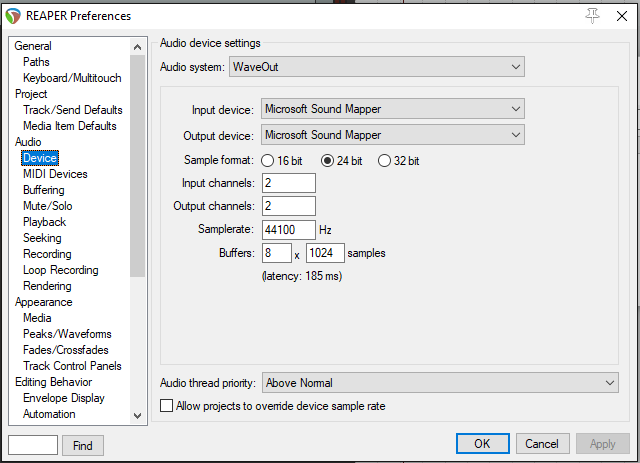
Go to Preferences in Reaper. (CTRL + P). Go to Audio / Devices. This is my normal setting, for using my kick-ass external USB audio interface, BEHRINGER U-PHORIA UMC204HD, though this may work on other hardware too):


All I did to make iSpring record audio is change my settings to this:

Be sure to change these settings back after you’re done recording your screen cast video.

That’s it!

–Michael W. Dean, BipTunia

“Dreaming in Swadesh” – microtonal song – 20 TET, 5 TET, 22 TET, (+ 12 edo)

Play


“SWADESH” refers to The Swadesh List, a group of 100 or so words that are are similar in most languages.

It is a list (or group of lists) showing the historical similarity in languages.

Everything in this song after the word “Glottochronology” is from the Swadesh List.

Music: Michael W. Dean
Words and speech: Phil Wormuth


LYRICS:
Speaking Swadesh
An exercise in linguistic glottochronology
Fish grease, dry claw, feather, egg –
louse-belly, knee, hand…
Bark dog! (tail what ear?)
This hair know rain, smoke, ash, sand.
Mountain cloud say cold – bite.
Tooth and tongue eat sun.
Eye see tree, seed, leaf, root –
burn the ear, eye, nose, mouth,
belly, breasts, heart, liver.
Eat yellow bird, swim; one-two…
hear dry horn bark hot.
Lie, sleep, die.
Good night. Dry moon walk black path.


FLAC 24-bit lossless of BipTunia’s 9th album “We Believe Us!”, legal torrent

FLAC 24-bit lossless of BipTunia’s 9th album “We Believe Us!”, legal torrent.

Also includes individual MP3s of all songs on album.

Get Magnet Link HERE   Please seed!

(Listen and preview the album here.)

Run time: 71 minutes.
Released November 24, 2018

Michael W. Dean: music, words, voice
Phil Wormuth: words, talking

Additional voices on “I Got Questions”: Kip Cameron, Debra Dean.


SONGS:

  1. Sumerian Waltz
  2. The Meaning of Life
  3. I Got Questions
  4. How to Survive a Nuclear Bomb
  5. Microtonal Prog McWorms
  6. I Believe Us
  7. A Manual for the Human Users


Listen on Spotify

Phil Wormuth: poems, speaking
Michael W. Dean: music, poems, speaking, singing

-=-=-=


Torrent RSS XML for our albums. Updated with each album:

(Says Feens in file path, but is BipTunia)

You can also use to automate getting all albums at once, with only a few clicks.

PLEASE SEED!

WHAT DO I DO WITH THESE LINKS? Info is HERE on the Freedom Feens site.


Experimental Xenharmonic Electronic Darkwave Heavy Pop

Music mood: Darkly cheerful

Will appeal to fans of: Gary Numan, Brian Eno, Pink Floyd, David Bowie, The Doors, Depeche Mode, Jim Carroll, Frank Zappa, Robert Fripp, Blondie, Kraftwerk, Led Zeppelin, Grateful Dead, and Dead Kennedys.

BipTunia styles: TripHop / Downtempo / Rock / Pop / Glam / Industrial / Ambient / Jazz / Space, not classifiable,  Darkwave, pop, rock, experimental

Song player for BipTunia’s 9th album “We Believe Us!”


SONG PLAYER:


Download lyric sheet

Listen on Spotify


We have T-shirts


ALSO:

Stream, buy, review, and share:

Get the T-shirt with the awesome album cover.

Album run time: 71 minutes.
Released November 24, 2018

Michael W. Dean: music, words, voice
Phil Wormuth: words, talking


LIST OF MICROTONAL TEMPERAMENTS used:
Sumerian Waltz: Monzo Sumerian simp12, Dudon Sumer. Also uses some good ole 12 edo.
The Meaning of Life: Not microtonal except that there are some quarter-tone synth bends starting around 4:20.
I Got Questions: 07-19, Ptolemy Tree, Zimbabwe Mbira,  (+ 12 edo).
How to Survive a Nuclear Bomb: 7 TET, 2 4-41, 24 edo, (+ 12 edo).
Microtonal Prog McWorms: 7 TET, 24 edo, (12 edo).
I Believe Us: 22 TET Porcupine[7] 3 3 3 4 3 3 3, (+ 12 edo).
A Manual for the Human Users: 24-41, 24 edo, (12 edo).


DOWNLOAD full album as a single file here.

This album also available as a lossless FLAC torrent, also has all the individual songs as MP3s. Link HERE.


ALBUM ART (click for large):

Download free BipTunia’s 9th album, “We Believe Us!”

Play


DOWNLOAD FULL ALBUM HERE.

preview songs here.

Download lyric sheet here.

Get the T-shirt with the awesome album cover.

This album also available as a lossless FLAC torrent, also has all the individual songs as MP3s. Link HERE.


Listen on Spotify

Run time: 71 minutes.
Released November 24, 2018

Michael W. Dean: music, words, voice
Phil Wormuth: words, talking

Additional voices on “I Got Questions”: Kip Cameron, Debra Dean.
BipTunia website: https://biptunia.com/

SONGS:

  1. Sumerian Waltz
  2. The Meaning of Life
  3. I Got Questions
  4. How to Survive a Nuclear Bomb
  5. Microtonal Prog McWorms
  6. I Believe Us
  7. A Manual for the Human Users


This album covered by the BipCot NoGov license, v1.2
https://bipcot.org/
This allows use and re-use by anyone except governments and government agents.
There are no government guns for violators, only shame.


Sculpture on cover is Sumerian male worshipper, alabaster with shell eyes, 2750-2600 B.C.E. Photo by Rosemaniakos from Bejing (hometown) – Flickr.

License: CC BY-SA 2.0