

I do a lot of things in a lot of different software environments. I do this all day every day.
When I have a problem I can’t solve from Googling, I figure it out myself, then make a blog post or YouTube video tutorial on how I did it. I like to help people. I also do tech writing for a living sometimes.
I’ve tried a bunch of free, and paid, screen cast recording programs for making these demo videos. The best one I’ve found is actually free. It’s iSpring Free Cam.
Problem is, I was getting no-audio videos whenever I filmed my DAW (digital audio program), Reaper.
Here’s the quick fix. May also work on other DAWs, or other programs. But here’s what I do to get audio on my videos:
Go to Preferences in Reaper. (CTRL + P). Go to Audio / Devices. This is my normal setting, for using my kick-ass external USB audio interface, BEHRINGER U-PHORIA UMC204HD, though this may work on other hardware too):

All I did to make iSpring record audio is change my settings to this:
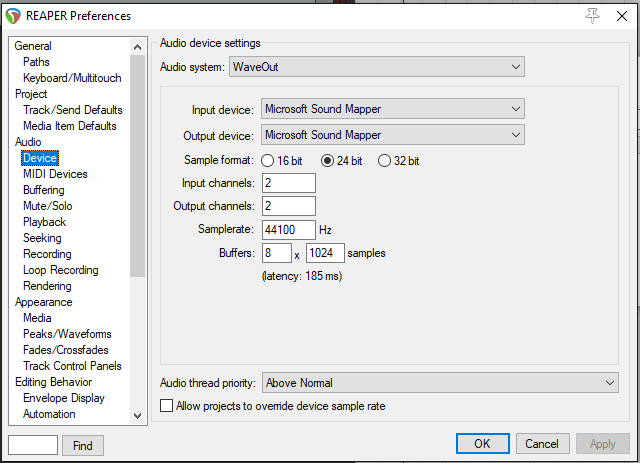
Be sure to change these settings back after you’re done recording your screen cast video.
That’s it!
–Michael W. Dean, BipTunia